IMAGE PROOFING
Image proofing software
Image proofing is a review of a still image that ends with a decision on one version. You upload a PNG, JPEG, or WebP draft, the client pins comments on that image, and an approval records that they accepted that version. If the image changes, you upload the next version and the review starts again.
ApproveLoop does not proof PDFs, video, or live websites, and it does not check print production. An approval is not a legal signature.
Free plan: $0. One active project, no credit card.
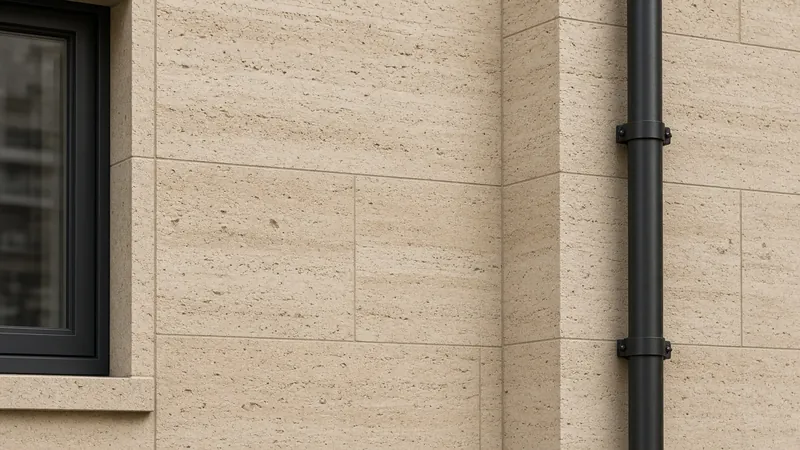
Change this pipe to bronze, and keep the stone joints.
EXAMPLE
A draft image, then the revised version
Fictional project, shown to illustrate an image proof. Not a customer’s work.

Client Soften the planting along this wall, and warm the pergola.

How do you proof images with a client?
Export the image, share one private link, and let the client comment on a point or approve that version. The review of an image ends when they approve it, or when you upload a new version and ask again. Comments and the approval stay on the version they saw. They do not create an account. ApproveLoop proofs PNG, JPEG, and WebP still images, including drawings and renders exported as those files.
How an image proof ends
The proof is the image they see. The decision stays with that version.
-
01
Upload the draft image
Add a PNG, JPEG, or WebP image. That file is the draft the client will proof.
-
02
Collect comments on that image
They open the private link and pin comments on that image. Submitting the comments counts as one revision round. They do not create an account.
-
03
Approve it, or upload the next version
When they approve, the review of that version ends. ApproveLoop stores their name, the version number, and the time. A changed image is a new version.
Comments on the image being proofed
A comment is a numbered pin on the image being proofed. It is not a drawn mark, a shape, or an arrow. You can reply in the thread. The pin stays on that version until you upload a new image.
The review ends on a version
Each upload is a new version of the image. Comments and the approval stay on the version the client saw. Approving ends the review of that version. It does not approve a later file, and it does not replace your contract.
Formats a proof can use
Proof PNG, JPEG, or WebP still images. ApproveLoop does not open PDFs, video, 3D models, native design files, or a live website. It also does not check print production details such as bleed, CMYK, or color-managed proofs.
Included
- PNG, JPEG, and WebP still images
- Comment pins on the image being proofed
- Approval that ends the review of that version
Not included
- PDF, video, and live websites
- Print checks such as bleed and CMYK
- A legal signature
Use it when the thing being approved is a still image: a drawing, a render, or another PNG, JPEG, or WebP. It is not a document proof or a website review.
Questions about image proofing
How does an image review end?
The client approves that version, and ApproveLoop stores their name, the version number, and the time. If the image still needs a change, you upload a new version and the review continues on that file.
Which image formats can I upload?
PNG, JPEG, and WebP. Export the frame you want proofed. PDF, video, and live web pages are not supported.
Does approval carry to the next image?
No. The approval stays on the image they accepted. A new upload is a new version and needs its own review.
How is this different from online proofing?
Online proofing in ApproveLoop is this image review, including drawings and renders exported as still images. This page is about proofing the image itself: a draft, comments on that draft, and a decision that ends on one version.
Related
Proof the next image on the free plan
One active project for the next image. Your client proofs it through a private link and can approve that version.
Start my free projectFree plan: $0. One active project, no credit card.