DESIGN FEEDBACK
Design feedback tool
A design feedback tool should show the client where to comment, so a vague note is attached to a cabinet, a color, or another detail. ApproveLoop does that for a PNG, JPEG, or WebP image. You send one private link. The client clicks the image and writes the note there.
ApproveLoop does not read WhatsApp or email, and it does not draw shapes or arrows. The client does not create an account.
Free plan: $0. One active project, no credit card.

Reupholster this sofa in warm tan, and keep the stone fireplace.
EXAMPLE
A note pinned to the cabinets
Fictional kitchen, shown to illustrate feedback on a detail. Not a customer’s work.
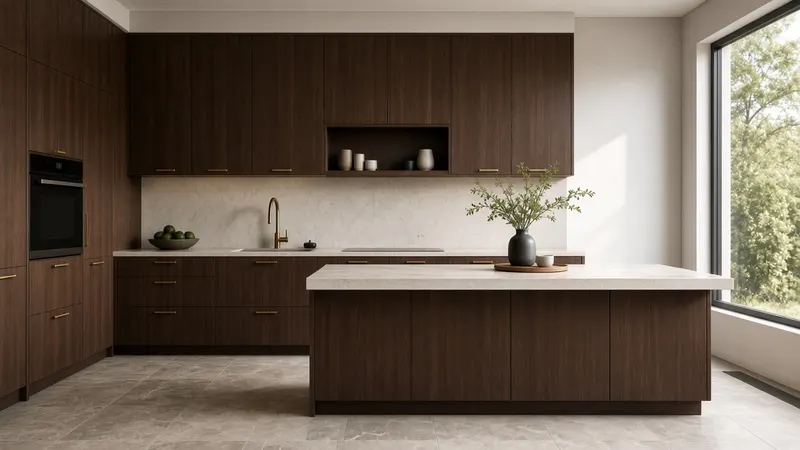
Client Paint these cabinets a warm off-white, and keep the brass handles.

How can clients give useful feedback on design images without confusing email threads?
Ask them to click the detail they mean. ApproveLoop drops a numbered pin on that point of a PNG, JPEG, or WebP image and keeps the words in a thread you can reply to. The pin stays on the version they were looking at. A later upload is a new version, so the first comment does not drift onto a file they have not seen. Email and chat can carry a screenshot, but the note is no longer on the file.
From a scattered note to a point on the image
The thread stays next to the image, instead of being rebuilt from messages and screenshots.
-
01
Upload the design image
Add a PNG, JPEG, or WebP export. The image is what the client comments on, not a screenshot they send back.
-
02
The client clicks the spot
They open the private link and click the detail. Submitting those comments counts as one revision round. They do not create an account.
-
03
Reply, then upload the revision
Reply beside the pin. When the image changes, upload a new version. The first comment stays on the first image.
The comment shows the spot
A useful comment names a point on the image. The pin shows where they clicked, and the thread holds what they wrote. A short message such as “make it warmer” is still their words, but it sits on the detail they chose. ApproveLoop does not turn that sentence into a new drawing for you.
Feedback stays on the version they saw
Comments belong to the version the client was looking at. They do not move when you upload the next image. An approval, if they give one, is a separate record on that same version.
Images clients can comment on
Collect feedback on PNG, JPEG, and WebP still images. A drawing, a render, or a flat concept all work the same way. ApproveLoop does not open PDFs, video, native design files, or a live website.
Included
- A numbered pin on a point of the image
- A reply in the same thread
- The comment stored on that version
Not included
- Connections to email or chat inboxes
- Drawn markup, shapes, or arrows
- PDF, video, and live websites
Use it when feedback arrives as screenshots and short messages, and you need the comment attached to the detail the client meant.
Questions about design feedback
Can clients draw on the image?
No. They click a point and write a comment. ApproveLoop does not add freehand marks, shapes, or arrows.
Do I connect my email or chat?
No. You send a private link. ApproveLoop does not read WhatsApp, email, or other inboxes.
What if they only say to make it pop?
The pin shows the spot they clicked, and the comment holds their words. You reply, then upload a revised image as a new version. The first comment stays on the first version.
Do clients need an account?
No. They open the private link in a browser. They do not install an app or create an account.
Related
Put the next round of feedback on the image
One active project, so the next round of comments sits on the image instead of in a thread of screenshots.
Start my free projectFree plan: $0. One active project, no credit card.