
FOR INTERIOR DESIGNERS
Interior design client portal
Interior designers get a concept approved before the next revision by putting the render in front of the client and asking for a decision on that image. ApproveLoop is a private link for PNG, JPEG, or WebP concepts: moodboards and room renders exported as images. The client pins a comment on a finish or a cabinet, and approval stays on that version.
This is not a product library, a shopping tool, or a 3D walkthrough. An approval is a project record, not a legal signature.
Free plan: $0. One active project, no credit card.

Upholster these chairs in natural linen, and keep the stone table.
EXAMPLE
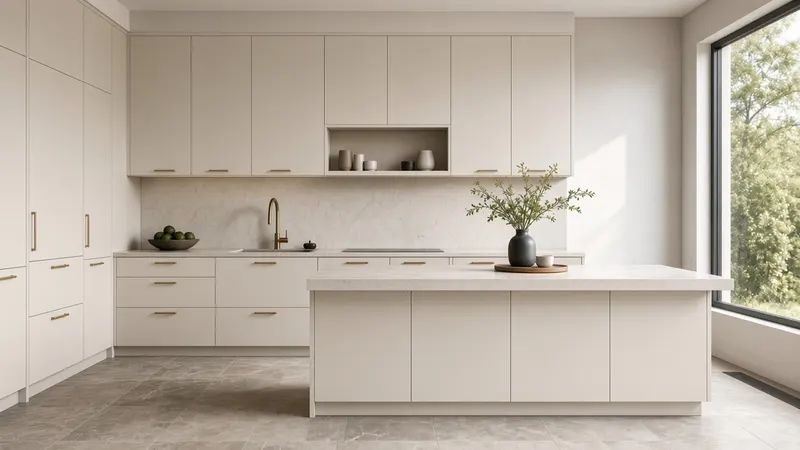
A kitchen concept, then the revised cabinets
Fictional kitchen, shown to illustrate an interior review. Not a customer’s work.
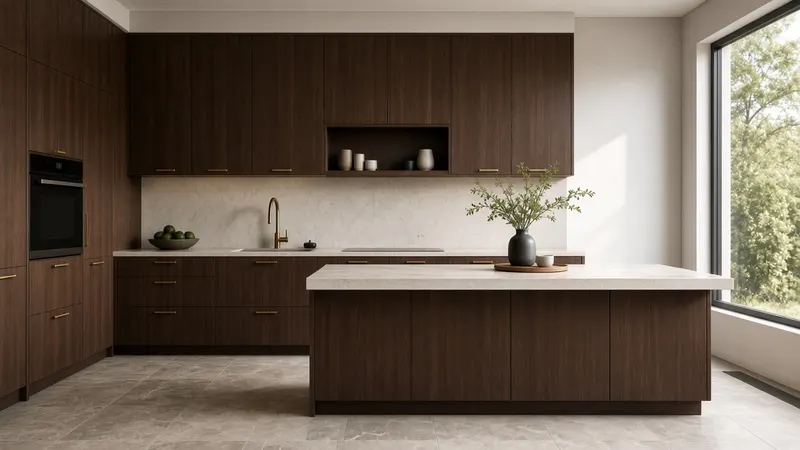
Client Paint these cabinets a warm off-white, and keep the brass handles.
How do interior designers get clients to approve concepts before the next revision?
Put the concept in front of the client as an image and ask for a decision on that version before you redraw it. Upload a PNG, JPEG, or WebP moodboard or room render, send one private link, and let the client pin a comment on a finish, a cabinet, or another detail. Approval stays on that version. The client does not create an account.
Approve the concept before you redraw it
The decision is about the image they saw, before you spend the next revision.
-
01
Share the concept
Export the moodboard or room render as a PNG, JPEG, or WebP image and send one private link.
-
02
Collect the comment on the detail
They click the cabinet, the finish, or another detail and write what should change. Submitting those comments counts as one revision round.
-
03
Revise, or record the approval
Upload the revised concept as a new version, or record approval on the version they accepted before you redraw it.
Feedback on a finish, not a product catalog
A comment is a pin on the finish or the detail the client means. You can reply in the thread. ApproveLoop does not shop for products, and it does not turn a vague “make it warmer” into a new drawing for you. The pin shows where they were looking.
The approved concept stays identifiable
Comments stay on the concept the client reviewed. An approval names the person, the version, and the time, and it does not move to the next upload. A later concept is a new version.
Concepts you can put in front of a client
Upload PNG, JPEG, or WebP exports of moodboards, kitchen concepts, and room renders. ApproveLoop does not open native design files, 3D walkthroughs, PDFs, or a product library.
Included
- Moodboards and room renders exported as images
- A pin on a cabinet, finish, or other detail
- Approval stored on that concept version
Not included
- A product library or shopping
- 3D walkthroughs and native design files
- A legal signature or a client account
Interior designers who present kitchen and room concepts as images and need the client’s comment on a specific finish before the next revision.
Questions from interior studios
Can I share a moodboard?
Yes, if you export the board as a PNG, JPEG, or WebP image. ApproveLoop reviews that still image. It does not open the native board file.
Does the client need an account?
No. They open the private link in a browser and pin comments. They do not create an account.
What if they only say to make it warmer?
The pin shows the spot they clicked, and the comment holds their words. You reply, then upload the revised render as a new version. The first comment stays on the first version.
Is approval a contract to build it?
An approval records their name, the version, and the time. It stays on that image. It is not a legal signature. If the concept changes, upload a new version and ask again.
Related
Ask for a decision on the next concept
One active project on the free plan, so the next kitchen or room concept has a place for comments and a recorded approval.
Start my free projectFree plan: $0. One active project, no credit card.